

Why a PokerNow Payout Calculator?
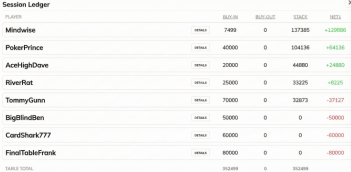
Every week after playing a cash game on PokerNow, someone in our poker group takes a screen grab of the ledger, manually calculates who owes who and shares a payout image from a Google Sheet. It’s not difficult, but it’s a pain, especially when players rebuy odd amounts, jump in and out of the game on different devices, change their screen names, or certain players prefer to pay specific players, etc. Mistakes happen.>
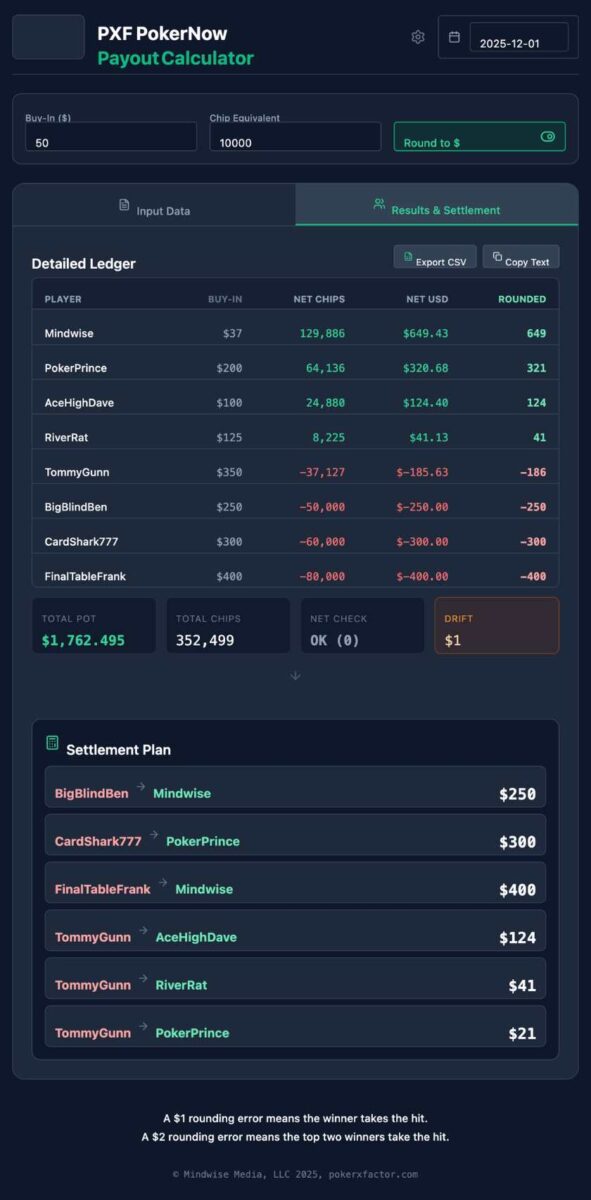
So we built this payout calculator: simply paste your PokerNow game URL (the same one you send to your friends), or copy/paste the ledger text or upload a ledger screenshot, and instantly get a more “detailed ledger” adjusted with your buy-in structure (e.g., $50 for 10,000 chips, which is the default).
Below the Detailed Ledger is a Settlement Plan, which is set to Manual Edit by default. Simply click the name of someone who owes money (in the Red Boxes) and it loads the player name into the payment field, then you decide who they pay and how much. You are finished when all the boxes are at zero. Because we round our payments (you can turn that feature on and off), there can be a drift of a dollar or two (we make the winners eat the rounding error because they are sooo lucky). Or, try the Auto settlement plan a few times until you like the choices. (We are working to improve the logic behind auto-assigning payouts.)
Finally, click the image creation button of the settlement and share it with the group. I also use the CSV creation button to save the data to a Google Sheet.
Please feel free to share with your PokerNow friends and send us any feature requests or bug reports. Enjoy and Good Luck. — mindwise
Quick start: Paste your PokerNow Game Link, or copy your ledger details and paste it below (or upload a screenshot), and then settle up!
Enjoy the tool? Help us defray AI costs.
Please tip via Venmo to: @mindwise

Latest Feature Updates
Toggle between rounding to the nearest dollar or settling to the exact penny.
Download your settlement results directly to a CSV file for your records.
One-click button to copy results for easy pasting into Google Sheets or Excel.
Current Version: 4.7 — Updated January 17, 2026